Cheddar's Scratch Kitchen
- 3.6
- Rating
- 100.00K
- Installs
- Free
- Price
 Analysis by App-foxy
I found Cheddar’s Scratch Kitchen most useful when I treated it as a practical companion for deciding what to order and where to go, rather than as a full restaurant-management app. It is a free Food & Drink app from Darden Restaurants, Inc. that brings the Cheddar’s menu, To Go ordering, and restaurant directions into one place. For a first-time user, that sounds simple, and in everyday use, simplicity is exactly its strongest quality.
The app is aimed at the moment when you are hungry, already thinking about Cheddar’s, and do not want to search through several pages or make an unnecessary phone call. I can browse the menu before leaving, decide whether To Go makes sense, and use the location tools when I need directions. The best reason to install it is to shorten the distance between “What should we get?” and a practical order or visit plan.
Getting from the download to a useful first order
I start by setting expectations: this is a focused restaurant app, so the useful first step is deciding whether you want to browse, plan a pickup, or simply find a location. I’d check the menu before building an order, then verify that the restaurant fits your route; that makes the first visit less about tapping through screens and more about choosing the right next step.
You May Also Like

 Blood Strike: 2.5 Anniversary
Blood Strike’s Loadouts Turn Every Drop Into a Tactical Gamble
A close look at Blood Strike’s custom loadouts: how fast access to signature weapons reshapes its battle royale rhythm, rewards preparation, and narrows the gap between fights.

 Pandora - Music & Podcasts
Pandora’s Music Is Easy to Start, but Harder to Recover
Pandora’s strength is its low-effort path from a seed to a station. Its weak spot is how much confidence it asks you to place in connection, setup, and quiet recovery.

 8 Ball Pool
 Is Built on Rivalries, Rematches, and Routine
A close look at the rivalries, rematches, shared routines, and unanswered safety questions that turn a quick pool match into a persistent mobile community.

 Samsung Music
’s Quiet Strength Is Playing What You Already Own
Its reach comes less from spectacle than from dependable access to a personal library. That simplicity is both the app’s strongest retention engine and its ceiling.

 AccuWeather: Weather Radar
AccuWeather Review: A Quick, Clear Forecast for Everyday Decisions
For everyday plans, the best forecast is the one you can understand quickly. AccuWeather makes rain timing, radar, and local conditions easy to act on, with a few trade-offs.

 Hill Climb Racing
Why Hill Climb Racing Still Turns Crashes Into One More Run
A tiny car, a bumpy hill and one more upgrade: Hill Climb Racing keeps resurfacing because its simple chaos makes every near-miss feel personal.
More From Our News Desk
View All News


What to expect before you begin
Cheddar’s Scratch Kitchen is not trying to replace every food app on your phone. Its focus is narrower: helping you interact with Cheddar’s directly. That distinction matters because the experience is most useful when you already want food from this restaurant. If you are comparing many nearby chains, looking for broad delivery coverage, or trying to discover completely unrelated restaurants, a general food marketplace may give you more variety.
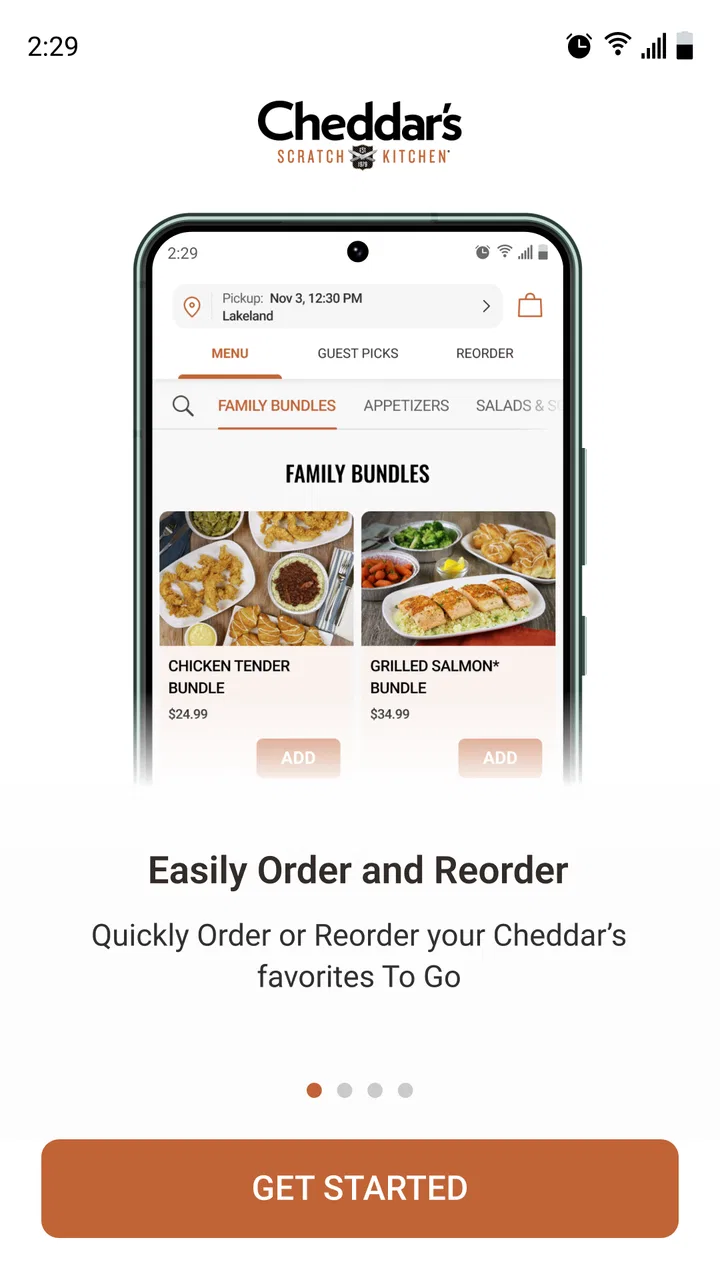
Once installed, I would approach it in this order: look through the menu first, choose a nearby restaurant, then decide whether to continue with a To Go order or simply use the directions. This sequence avoids a common mistake with restaurant apps, which is starting an order before checking whether the available location is convenient or whether the menu has what everyone in the group wants.
The app is free and rated for Everyone, so it is approachable for households where several people may use the same phone. It requires an operating system version of 11 or later, which is worth checking before downloading if you use an older device. The current version is 7.10.0, and the app has passed the one-hundred-thousand-install mark, with an average rating of 3.6 from around nineteen hundred ratings. Those figures suggest a useful but not universally loved experience, and that matches how I would position it: convenient for the right task, but not essential for every diner.
One practical advantage is that the app keeps the restaurant’s own menu at the center of the experience. That can be preferable to relying on a third-party listing, where menu presentation, availability, or ordering steps may feel disconnected from the restaurant you intend to use. I still recommend checking the details carefully before committing, especially when ordering for several people, because the convenience of a dedicated app does not remove the need to review your choices.
First setup: keep it simple and choose the location carefully
My advice for the first launch is not to rush straight into customization. Begin by finding the Cheddar’s location that actually serves your area. This is more important than it sounds: a restaurant app can feel confusing when the selected location is wrong, because the menu and ordering path may not reflect the place you plan to visit.
Use the location and directions function as an early check rather than saving it for the end. If you are ordering for pickup after work, compare the restaurant’s position with your route home. If you are meeting relatives, look at the directions before everyone agrees on a location. This small habit prevents the frustrating situation of building an order and then realizing that the selected restaurant is on the opposite side of town.
I also recommend browsing without deciding immediately. The menu is useful as a planning tool for a group: one person can inspect main dishes, another can think about sides, and someone with a dietary concern can identify questions to resolve before the order is placed. Even if you eventually order in person, having the menu open reduces the pressure of making choices while standing at the restaurant.
Because this is a restaurant-specific app, the setup should not be treated like creating a broad dining profile. Its value comes from using the right Cheddar’s location and moving through the menu efficiently. If you only want directions for a single visit, you may not need to spend time exploring every part of the app. If you expect to order To Go regularly, it is worth becoming familiar with the location-selection flow so that you do not repeat the same checks every time.
Your first meaningful success: build a To Go order without rushing
The first successful action I would recommend is a small To Go order for one or two people. A smaller order makes it easier to understand the menu, confirm the selected restaurant, and notice how the app presents the final review before you rely on it for a larger family meal. It is a better learning exercise than trying to coordinate a complicated group order on the first attempt.
Start by reading the menu as a whole instead of tapping the first appealing item. I like to identify the main dish first, then consider the accompanying choices and the practical question of whether the food suits the journey home. A short trip and a long trip create different expectations for a To Go meal, so timing and location matter as much as the menu choice.
Before submitting anything, pause at the review stage. Confirm the restaurant, the items, quantities, and any selections attached to those items. This is one of the most important habits with a dedicated ordering app: the screen may make the process feel quick, but a quick order is only useful when it is sent to the correct place with the correct contents.
For a realistic weekday example, imagine leaving work later than planned while your household is deciding what to eat. I would open Cheddar’s Scratch Kitchen, check the nearby location, browse the menu while someone else chooses what they want, and use the To Go path instead of waiting for a table. The app is valuable here because it turns a vague dinner conversation into a concrete plan. I would still check the route before leaving, since a pickup that adds a long detour may be less convenient than eating at another nearby option.
A second useful scenario is a family member asking what Cheddar’s serves before agreeing to go. Rather than describing the menu from memory, I can show the options directly and let each person make a decision. That reduces misunderstandings, particularly when one diner wants a specific type of meal and another is choosing mainly based on side options.
Where first-time users may hesitate
The most likely confusion comes from expecting the app to behave like a universal delivery platform. Cheddar’s Scratch Kitchen is centered on Cheddar’s restaurants and To Go ordering, so its purpose is not to present every restaurant in your area or act as a general-purpose delivery search. If your priority is comparing delivery fees, browsing multiple cuisines, or combining items from different restaurants, another category of app will fit better.
Another point of friction is the difference between browsing and ordering. Looking at the menu is useful even when you are not ready to buy anything, but the ordering flow requires more attention to the selected location and the final details. I would not assume that choosing a restaurant for directions automatically means the same choice will remain obvious during ordering. Treat the location as something to verify whenever you begin a new order.
It is also easy to mistake a restaurant app for a guarantee of speed. The app can help you place a To Go order, but your overall experience still depends on the restaurant, the travel time, and how carefully you choose the pickup moment. I see the app as an organization tool, not a promise that every order will be ready instantly.
Some users may also wonder whether they should use the app if they are already inside a Cheddar’s restaurant. In that situation, its main value is lower. If you are seated and ready to speak with staff, the app may add an unnecessary step. I would use it before the visit, for planning, or when To Go is the goal. It is less compelling when a direct conversation at the restaurant is already quicker.
For people who prefer a large visual discovery experience, the focused design may feel limited. I appreciate not having unrelated restaurants competing for attention, but that same focus means there is less reason to open the app when Cheddar’s is not already under consideration. This is a genuine trade-off rather than a flaw: specialization makes the relevant path easier while reducing its usefulness for general food exploration.
How it compares with the usual alternatives
Compared with a web search, the app gives me a more direct route to Cheddar’s menu and restaurant directions. A search engine is still useful when I want reviews, operating information, or a broad comparison with nearby restaurants, but it can send me through several pages before I reach the action I actually need. The dedicated app is better when the decision to visit Cheddar’s has already been made.
Compared with a third-party food marketplace, the app feels more focused. A marketplace may be better for discovering alternatives, comparing restaurants, or checking several delivery options in one session. Cheddar’s own app is the more natural choice when I want to browse this restaurant’s menu and pursue its To Go route without unrelated listings getting in the way.
Compared with calling the restaurant, the app is more comfortable for people who want to read choices at their own pace. I can discuss the menu with another person before placing anything, and I do not have to remember every option while speaking. Calling may still be better for an unusual request or a situation that requires a direct explanation, because an app cannot replace a conversation when the question falls outside the normal ordering path.
Compared with simply visiting without preparation, the app is strongest for reducing decision time. I can check the menu before getting in the car and use directions when I am unfamiliar with the area. The trade-off is that I need to pay attention to the digital order details instead of relying on staff to catch a misunderstanding during a conversation.
Small habits that make the app work better
My first tip is to use the menu before hunger makes the decision for you. For a group, ask everyone to choose a preferred main direction before one person starts the order. This prevents the person holding the phone from becoming the default decision-maker and makes the final review much faster.
My second tip is to separate location checking from menu browsing. Find the restaurant first, inspect the route, and only then build the To Go order. This workflow is especially helpful when you are traveling, collecting food on the way home, or choosing between more than one possible Cheddar’s location.
My third tip is to make the final review a deliberate checkpoint rather than a quick tap. Read the item names, quantities, and selected location aloud when ordering for a family. That simple practice catches the kind of mistake that is annoying to fix after leaving the restaurant, particularly when several people have contributed choices.
A fourth insight is that the app can be useful even when you do not place an order. I use the menu to set expectations before a visit, which makes it easier to decide whether Cheddar’s fits the group. If nobody finds a suitable choice, discovering that before driving there is a real convenience. In that sense, browsing is not merely a preliminary step; it is a way to avoid an unsuitable restaurant trip.
Finally, keep the app’s role in proportion. It is not necessary to open it for every meal, and installing it will not improve a visit if you rarely choose Cheddar’s. Its strongest value appears in repeat situations: planning a To Go meal, checking the menu for guests, or finding directions to a restaurant you already intend to visit.
Who should use it, and who should skip it?
I would recommend Cheddar’s Scratch Kitchen to regular Cheddar’s customers, people who prefer planning before arriving, and households that often coordinate meals for several diners. It is also a sensible download for someone visiting an unfamiliar area and wanting the restaurant’s menu and directions in one focused place. Since it is free and rated for Everyone, there is little financial risk in trying it if Cheddar’s is already part of your dining routine.
I would be less enthusiastic for someone who wants one app to cover every restaurant, delivery provider, and cuisine. A general food platform will usually be more useful for broad discovery. I would also skip it if you only need a one-time direction and already have a preferred maps tool, unless you want to browse the Cheddar’s menu at the same time.
Users on older phones should check the operating-system requirement before planning around the app. People who need highly customized assistance may prefer contacting the restaurant directly, while diners who are already seated may find that ordering through staff is simpler. Those are not reasons to dismiss the app; they are situations where its focused workflow is not the best match.
My final take after using it as a planning tool
Cheddar’s Scratch Kitchen succeeds when I use it for exactly what it is built to do: inspect Cheddar’s food choices, prepare a To Go order, and find the way to a restaurant. The experience is more useful before the meal than during it, and more useful for a planned Cheddar’s visit than for general restaurant discovery.
I like the directness, especially when a group needs to decide quickly without searching through unrelated services. I also value the ability to check the menu before leaving, because that turns a restaurant visit into a more predictable plan. The limitations are equally clear: the app is specialized, location details deserve careful checking, and it cannot replace a general marketplace or a direct conversation in every situation.
If you are trying it for the first time, start with the menu, confirm the restaurant, and make a small To Go order only after reviewing the details. That path gives you a fair test without adding unnecessary complexity. For my use, the app is worth keeping when Cheddar’s is a recurring choice, not because it does everything, but because it handles this one restaurant-focused job with useful convenience.
Cheddar’s Scratch Kitchen is available at no cost, with an Everyone content rating. Its developer is Darden Restaurants, Inc., and the app belongs to the Food & Drink category. I would describe it as a practical, focused download: a good fit for first-time menu planning and repeat To Go visits, but not a replacement for broader food apps when your needs extend beyond Cheddar’s.
FAQs for Cheddar's Scratch Kitchen
01What is the Cheddar’s Scratch Kitchen app used for?
The Cheddar’s Scratch Kitchen app is designed to make visiting the restaurant more convenient. Depending on your location and the features currently available, you may be able to browse the menu, view food and drink details, find nearby restaurants, check opening hours, place an order for pickup or delivery, and access restaurant information before you visit. Available options can vary by region and device.
02Can I order Cheddar’s Scratch Kitchen food through the app?
In supported locations, the app may allow you to order meals for pickup or delivery, although ordering availability depends on the restaurant, local service coverage, and current operating hours. After selecting a nearby location, review the menu, customize eligible items, check the estimated preparation time, and confirm all charges before submitting your order. Delivery fees and minimum order requirements may apply.
03Does the Cheddar’s Scratch Kitchen app offer rewards or special promotions?
Cheddar’s may provide promotional offers, restaurant deals, or loyalty-related benefits through its official digital services, but the exact program and availability can change over time. Offers may be limited by location, expiration date, menu item, or purchase method. Before relying on a discount, open the promotion details carefully and check whether it applies to dine-in, pickup, delivery, or online orders.
04Can I customize menu items and view allergy information in the app?
The app may show ingredients, nutrition details, and customization choices for selected menu items, which can help you decide what to order. However, restaurant food is prepared in a shared kitchen, so cross-contact with allergens may be possible. If you have a serious allergy or dietary restriction, use the app as a starting point and contact the restaurant directly for the most accurate and current information.
05Is the Cheddar’s Scratch Kitchen app free and available on both Android and iPhone?
Downloading the official Cheddar’s Scratch Kitchen app is generally free, although placing an order may involve food prices, taxes, service charges, delivery fees, or other applicable costs. Availability can differ between Android and iOS, and some features may only work in selected areas. To avoid unofficial copies, download it through the Google Play Store or Apple App Store and verify the publisher before installing.
Pros
- Generous portions make it easy to share meals or save leftovers.
- Comfort-food menu includes familiar choices for different tastes.
- Scratch-made focus gives many dishes a more homemade feel.
- Family-friendly atmosphere suits casual group dining.
- Frequent promotions can make visits more affordable.
Cons
- Wait times may be long during peak lunch and dinner hours.
- Some menu items are high in calories
- sodium
- or saturated fat.
- Portion sizes can make lighter eating difficult without modifications.
- Menu availability and specials may vary between restaurant locations.
- The app offers limited value if you rarely dine at Cheddar’s.

Cheddar's Scratch Kitchen
Gallery